Free AI Image Editor for Fast Online Photo Editing
Supports JPEG, JPG, WEBP, PNG
Free trial for higher quality image generation
Get a faster, higher-quality, ad-free experience of generating images through our professional website
Free AI Image Editor Examples
See how the free AI image editor turns a simple uploaded photo into a new visual direction. Use prompts to adjust details, change style, replace text, refresh backgrounds, and create attractive images for personal, product, and creative projects.
Prompt-Based Photo Edits
Original photo
Change the person's hair color to warm blonde while keeping the face, lighting, and natural photo look consistent.
AI Photo Style Makeovers
Original image
Transform the photo into a soft cinematic anime look with clean colors, expressive lighting, and a premium illustration finish.
Convert the image into a clean pencil sketch while preserving the main pose, composition, and recognizable details.
Text, Branding, and Detail Updates
Original design
Replace the text in the image with "Free AI Image Editor" and keep the perspective, lighting, and surface texture realistic.
Powerful Features of the Free AI Image Editor
This free AI photo editor combines image-to-image generation with natural language instructions, so you can edit images by describing the result instead of learning complex layers, masks, or manual brush workflows.
Edit Photos with Simple Text Prompts
Upload an image and type what you want to change. The AI image editor understands subjects, composition, lighting, color, and style, then redraws the image while keeping the important visual structure intact.
Background, Object, and Detail Changes
Use the AI photo editor to replace a background, remove visual distractions, refresh an outfit, adjust hair color, update text, improve props, or create a cleaner product scene from the same source image.
Style Transfer and Creative Retouching
Turn a normal photo into anime art, sketch, cinematic portrait, product mockup, poster, avatar, or branded social image. Explore several creative directions from one uploaded image without rebuilding the design from scratch.
Free, Online, and Easy to Re-Edit
Start editing directly in your browser with no signup required. Download your result, adjust the prompt, upload another reference, or use the generated image as a new starting point for deeper AI photo editing.
What Can You Create with a Free AI Photo Editor?
The free AI image editor is built for creators, marketers, sellers, designers, and everyday users who need attractive photo edits fast. It helps transform existing pictures into fresh, usable visuals for work and play.

Product Photos and E-commerce Images
Improve product shots, test new backgrounds, create lifestyle scenes, and produce cleaner catalog visuals from one product photo. It is useful for ads, listings, banners, and quick campaign concepts.
Portraits, Avatars, and Profile Photos
Restyle portraits, adjust mood, change outfits, experiment with lighting, or create polished profile images while preserving the person's core appearance and the original photo composition.
Social Media and Content Design
Create thumbnails, cover images, post visuals, story assets, and eye-catching promotional graphics. The AI photo editor helps you turn one image into multiple share-ready creative variations.
Design Exploration and Creative Ideas
Use any reference image as a starting point for mood boards, concept art, posters, illustrations, brand visuals, and fast visual brainstorming. Generate new options before committing to a final design.
How to Use the Free AI Image Editor
Editing with AI is simple: upload your photo, describe the edit in plain language, and generate a new image. You can keep refining the prompt until the result matches your idea.
Upload Your Photo
Describe the Edit
Generate, Download, or Refine
Add Production-Ready AI Photo Editing with Reliable Image APIs
Bring intelligent photo editing directly into your product. Compare stable APIs for retouching, background changes, object removal, product cleanup, portrait enhancement, creative restyling, and automated image workflows that stay affordable as usage grows.
GPT Image 2 API
A versatile OpenAI image API with strong prompt adherence, flexible quality controls, clear text rendering, and dependable generation or editing for production applications.
View API DetailsGoogleNano Banana Pro API
A Google-powered option for high-quality generation and reference-guided editing, useful for creative assistants, product visuals, character consistency, and iterative image workflows.
View API DetailsByteDanceSeedream 5.0 Pro API
A premium image generation API focused on polished detail, realistic and commercial visuals, and reliable output for demanding marketing, design, and production work.
View API DetailsAlibabaQwen Image 2.0 API
A cost-effective Alibaba image API with multilingual prompt understanding, sharp text rendering, realistic output, and flexible generation for high-volume applications.
View API DetailsAlibabaZ Image API
An affordable Alibaba text-to-image API for product imagery, social assets, editorial visuals, design prototypes, and scalable creative automation.
View API DetailsAlibabaQwen Image 3.0 Pro API
A powerful Alibaba image generation and editing API with image editing capabilities comparable to GPT Image 2, strong prompt understanding, precise visual changes, and dependable output for professional creative workflows.
View API DetailsStart Faster with Production-Ready Seedream 5 and Qwen Image 3 Prompts
Skip the blank prompt box and learn from reusable, open-source recipes built around real creative deliverables. These community libraries organize prompts by task, explain how to control composition and editing, and provide multilingual references that you can adapt for product images, advertising, portraits, design systems, educational visuals, and more.
Awesome Seedream 5 Prompts
A practical Seedream 5 cookbook for generation, editing, visual communication, and repeatable production work, with detailed recipes that go beyond short style keywords.
- 94 original prompts organized across 15 practical creative categories.
- Localized prompt resources for 15 languages plus a structured prompt schema.
- MIT-licensed examples for ads, products, portraits, UI, comics, documents, and editing.
Awesome Qwen Image 3 Prompts
A broad Qwen Image 3 prompt collection designed for practical image generation and editing, with visual examples, reusable templates, and workflows for both everyday creators and production teams.
- 144 original prompts across 18 categories with 19 generated examples.
- 15-language resources, 16 templates, and a 60-plus use-case matrix.
- MIT-licensed recipes for ecommerce, branding, portraits, posters, UI, and precise edits.
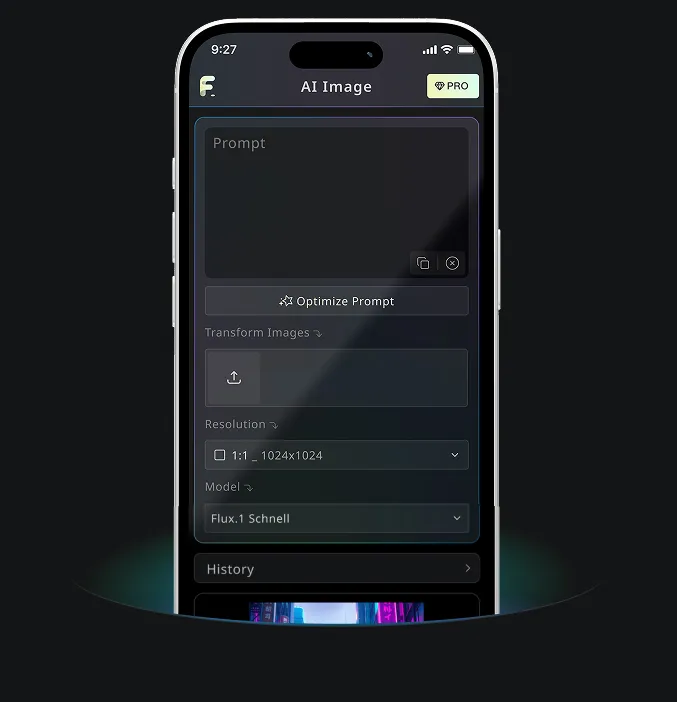
Android & iOS Mobile Application for Free AI Image Generator
Download Free AI Image Generator mobile Application now to tap into Free AI Image Generator's robust tools—boost your creativity with a spark of inspiration that transforms words into stunning visuals!